


Lensball
A lensball is a fun way to break away from the normal photos and get a bit creative. Here is a photo I took of a friend photographing the St. Louis Arch, I took his photo through a lens ball that was sitting on a tripod next to him.
Lens Ball (80mm), K9 Crystal Ball with Stand and Silk Bag, for PhotographyCheck Price
Textured Backgrounds
Whenever you want the background to be different from your photo it is
quite simple to change backgrounds in Photoshop. Some backgrounds I
make myself and others I get online. Whichever method you choose, the
tips in this post will help you to change your background. Photoshop Texturing Techniques

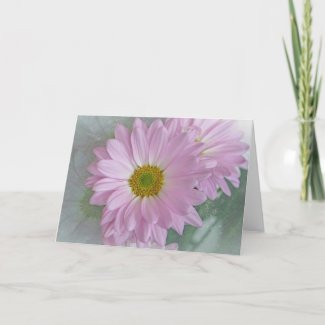
The photo above is a shot of an African daisy put on a textured
background.
Combining Techniques
Now for the fun and creative part. When you take photos with a lensball
first of all the photo is upside down and second the background just never
seems to look right. At least mine usually doesn't. I was
contemplating this problem when I thought about my textured background
technique I love to use and decided I could apply it to my lensball
photos. Here is a photo I created using these combined techniques and
then the steps I followed to create the photo.

- First I took a photo of my new Dipladenia plant and edited it in Lightroom. I saved the photo on my desktop.
- Next I took a photo of the same plant using my crystal photo ball. I put the photo ball stand on a table right next to the plant and focused my camera on the plant image inside the ball. I brought the photo into Lightroom and inverted the photo so the image in the ball is right side up.
- Next I opened the first photo in Photoshop.
- With the first photo open I clicked on File and Place Embedded in Photoshop.
- This brought the ball photo into photoshop covering the original photo. I then used the Lasso tool to outline the ball and I clicked on Create and Mask in the top bar.
- Now I used the slider to get the effect that I wanted. I used the transparency and the feather sliders. I next clicked done.
- Now I click on the little square mask symbol at the bottom of the layers column and again moved the sliders to get the desired effect.
- Finally I used Save As and named my file and saved it as a JPeg file.
I do this procedure as second nature now, but it took me a lot of practice
before I got any results that I was happy with. I wish you much fun
and success in your quest for Creative Photography.
Note: The author may receive a commission from purchases made using links found in this article. “As an Amazon Associate, Ebay (EPN), Esty (Awin), and/or Zazzle Affiliate, I (we) earn from qualifying purchases.”
FOLLOW US ON:





You have really become a professional in the world of photography, Mary Beth, and in regard to editing your photos creatively in Photoshop. Your creative photography tips are always so interesting and your photographs a joy to view.
ReplyDeleteAs always, you have not only given us wonderful photography tips, but awesome inspiration with you own photos. I really love your textured backgrounds. I can see that I really need to take the time to play around with Photoshop.
ReplyDeleteYou are such a talented photographer and image editor! Thanks for another wonderful tutorial.
ReplyDeleteYou are so talented. I need to break my husbands hold on the digital camera we bought, so that I can try my hand at taking some amazing pictures too!
ReplyDeleteThat's a great tutorial and it sounds like fun to experiment with these techniques. Have you considered putting your tutorials into a book yet? Or a video?
ReplyDelete