Monday, October 23, 2017

Reviewing the Many Flavors of M&M's

Chocolate is my guilty pleasure.  M&M's are my favorite chocolate candy.  I love that I can keep a large bag of the little chocolate treats around and sometimes just one or two pieces are enough to satisfy my craving. Other times, I sit down with an entire bag. As Mars began adding different flavors to the M&M's line, I was fearful that they would ruin the original thing. We can all think of examples of when the "new and improved" isn't as good as the original. But that is not the case with M&M's. The original plain and peanut M&M's are as good as always. And the newer flavors are amazing. Are you familiar with all of the flavors? 


What are M&M's?


I can't imagine that there is a single person reading this review that doesn't know what M&M's are. But as a responsible reviewer, I will explain - just in case.

M&M's are delicious, roundish bits of chocolate covered in colorful candy shells.  

M&M's were first manufactured by Mr. Mars in the 1940s. It is thought that the idea for M&M's began in the 1930s when soldiers covered chocolate in a sugary coating to prevent it from melting. Mr. Mars created the shell coating over his small bits of chocolate for a similar reason - to be able to sell chocolate in even the warmer seasons. Thank you Mr. Mars!


Plain M&Ms and Peanut M&M's


Plain milk chocolate covered by the candy coating and peanuts covered by chocolate covered by the candy coating were the original M&M's. At least in my memory. I grew up eating them. They were my favorite thing to find in my bag at Halloween. I loved to find them baked in cookies. 


Peanut Butter M&M's

It is an entire bag of M&Ms day

More recently, Peanut Butter M&M's have been my favorite (as shown in the photo). These little treats are made with real peanut butter and I believe that is why they taste so good to me. I do not enjoy artificial peanut butter flavored candies. 


Caramel M&M's


Oh yes, caramel M&M's! I was so excited to find these on the store shelves. I love caramel treats: caramel squares, Rolos, and caramel apples - just to name a few. Even though I have been an M&M's fan over the years, I wasn't optimistic when I tried this flavor. I half expected the "soft center" to be a yucky, runny, caramel-flavored ooze. That is not at all what Caramel M&M's are like. They are delicious! 


The Many Flavors of M&M's


I guess rather than highlight each flavor, I'll just list them here. And leave it with my thought that there's not a new flavor of M&M that I haven't loved.  

  • M&M's Crispy
  • M&M's Pretzel
  • M&M's Dark Chocolate
  • M&M's Almond
  • M&M's Dark Mint
  • M&M's Dark Chocolate Peanut

Mars also offers seasonal flavors and limited editions. Some examples of those are:

  • M&M's Candy Corn Chocolate
  • M&M's Pecan Pie
  • M&M's Pumpkin Pie
  • M&M's Coffee Nut
  • M&M's Strawberry Nut

Intro photograph courtesy of Wikimedia Commons

Related Links:


Amazon is one of the places that you can easily find any limited edition flavors that are still available. Have your chocolate treats delivered right to your door and eat chocolate without leaving that house. Click on one of the items below to search Amazon for M&M treats.

Are you already an M&M's fan? Do you want to design your own M&M's? Choose your own colors? Create candies that match your wedding or celebrate a special occasion. Would like like to give them as personalized gifts? Believe it or not, you can add your own letter, word, clipart, or photo with MyM&M's


Note: The author may receive a commission from purchases made using links found in this article. “As an Amazon Associate, Ebay (EPN), Esty (Awin), and/or Zazzle Affiliate, I (we) earn from qualifying purchases.”


Sunday, October 22, 2017

3 Ways to Increase Sleeping Space when You Have Company

Full Over Full Bunk Beds to Maximize Space
With the holiday season approaching, making room for company can sometimes be a challenge.

If you're looking for practical ways to either increase sleeping space or provide privacy in open areas, here are three product reviews to solve that problem.

Double Bed Bunk Beds

That's right, there is such a thing as full sized beds as bunk beds. Full sized bunk beds provide double the space for kids. They're great for couples with kids, or just as a place for all the children to bunk together.

Two double beds stacked on top of each solve major space issues. With limited space you can provide sleeping arrangements for four people. Again, if you have a young family visiting, sleeping is solved with approximately six feet by seven feet of floor area for the bed itself.

Join Two Single Beds Together to Make a King Sized Bed
Use a Twin Bed Connector to Convert to a King


If all you have are twin beds in a spare room, there's a way to turn two twin beds into a king size bed.

Pushing the twin beds together is not enough: The dip in the middle makes two mattresses abutted against each other difficult to sleep in. That's where a twin-bed-connector comes into play.

With a connector you can remove that dip in the middle as well as secure the mattresses so they don't slip. You can read more about how to do this here.
Find Canopy Tents Here

Put a Canopy Tent Over a Single Bed in an Open Area

If you have an open area in the home with several twin beds (like a dorm room) you can add a Canopy Tent over each of them to give people their own private area without the need for dividers or walls.

They're easy to put up and of course just as easy to remove.

They're also ideal for kids who share a room. It provides privacy without having to go to the expense of redecorating or giving each child their separate room.

Of course, these items work all year around. Plan ahead, and you'll be all set for the holidays.


Note: The author may receive a commission from purchases made using links found in this article. “As an Amazon Associate, Ebay (EPN), Esty (Awin), and/or Zazzle Affiliate, I (we) earn from qualifying purchases.”


Saturday, October 21, 2017

How to Create Pinterest Images with Photoshop


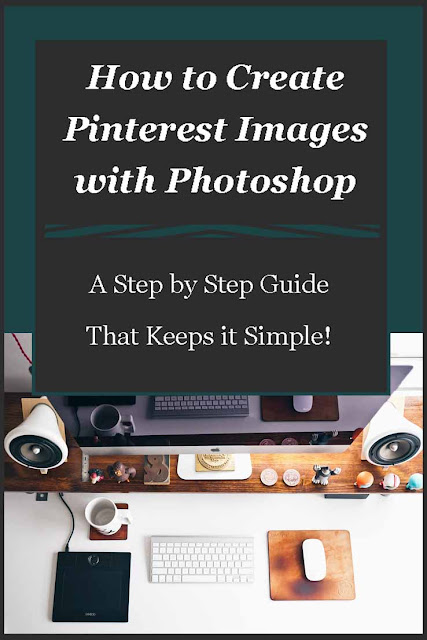
How to Create Pinterest Images with Photoshop - A Step by Step Guide
Today I'm going to review how to create Pinterest images with my favorite photo editing software - Photoshop!  I create most of my Pinterest images with Photoshop, I have tried a few other places, but I always come back to Photoshop.

I've been asked quite a few times how I create my images for Pinterest which is why I thought I'd just show you.  Now I can't promise you that your images will take off in popularity on this social media platform, but I can promise you that the steps will be easy to understand.

I have been using Photoshop for a few years now, but the way I create the majority of my images are easy for beginners and experts alike to follow.

The first thing you have to do is open up your Photoshop and select a new file, I simply press Ctrl N to do this, but you could use the file menu and open it that way.

You will be greeted with a pop up box where you have to select your image details, it looks like this -

set image measurements on photoshop

I only change two things on the default and that is the width and height as you can see on the image.  I have changed the image height a few times, but the majority of the time I just use the standard 738 x 1105.

The next step means finding the image you want to use for your pin so I've decided that I want to do a pin for my welcome to Lou16.com post (I can't believe I was missing a Pinterest image on that post until I wrote this!)

I'm going to use the image I have in my introduction as the main image for my Pinterest image as well so let's have a look at what we're going to do....

add image to draft for Pinterest with Photoshop,

So the first thing I do is create a new file, then I open up the photo I want to use and drag it onto the new file.

1.  Here you can see that this image has a border that I created previously.  I'm going to use this color for the background so to do this I need to use the eyedropper tool to select the exact color.
2.  This is the eyedropper tool.  To use this you click on the tool and then click on the color that you want to select.
3.  After selecting the color I make sure to select the correct layer (in this case the blank one as I'm using this for background.
4.  The paint bucket tool will cover the layer with the selected color.

After doing all of these steps you'll be left with the next image.

add background color to Pinterest images with Photoshop,

3.  I'm going to do things backwards here and get you to look at number 3!  When I did the background color the teal was on top and the white was underneath, as I'm thinking of doing the text in white I switched them around.  Sometimes when you're using two colors you can just change between these two to save having to use the eyedropper tool again.

Back to our image..

Now I want to add some text to the image so I have to select the text box.

1.  This is the Text box and you have to click on this before adding any text.
2.  This is the text tool bar, you can change the color from here (it will default to the top square at number 3 unless you change it), you can also alter the font, the font size and whether you want to use a bold or italic or both.

add text on Pinterest images with Photoshop,

As you can see I dragged the image down a little so that I could add text above and below it.  Above I just used regular and underneath I selected italics.  You can also highlight just one or two words and change their color or size in order to make an impact.

1.  There are different things you can select on the side including a border which I always use for my Pinterest images.  You select the border (or arrow as I have done on these images for you) and click apply - the color on top of the color box is what color the object will appear as.

I didn't want to use white as a border because the website background is white so I used the eyedropper tool to select another color from the photograph.

I always try to pull either the border, background or text (sometimes all of them) from the actual photo as you know it's going to go.

Create Pinterest images with Photoshop,

I always keep Photoshop open until I see the final image uploaded to the website.  In this case I uploaded the border from a light green in the foliage that really made it pop on Photoshop, but looked strange on the white background of the website.

I then changed the border to the blue of my t-shirt, but again on the white background of this site it just didn't look quite right.  The third and final one is what is pictured above and I've use the brown of my hair!

Now you don't always have to use a photo, sometimes I'll use a graphic from a site like Pixabay and use that.

This is a very basic way to create a Pinterest image using Photoshop, as you get used to using it you can get more and more creative with using several images merged together like this one from another post I created -

Get Traffic to Your Website

In this image I used an image of traffic which I reduced and played with to get it to fit onto the laptop screen.  The background is taken from the laptop color and you can see I changed the color and font size of the 21 in the image.

Start off simple and as you get used to using these tools you'll find yourself creating all kinds of images, try not to become too addicted to Photoshop as once you start down this rabbit hole you can lose all sense of time!

You might be interested in my other Photoshop tutorial (and there will probably be more to come!) -


Peach Cobbler RecipeHow to Remove Blemishes From Photos Using Photoshop
Let's review how easy it is to use Photoshop to remove blemishes from photos, trust me it's really simple and well worth the time spent to restore old family photos.


Our contributors here on Review This also use other platforms to create their images for Pinterest so be sure to check out our tips for writers including -


... and let's not forget our Pinterest tips -


Before leaving I'd like to tell you one of the things that really helped me with getting traffic from Pinterest (obviously the images help!) and that was using Tailwind, I highly recommend this scheduling tool for anyone who wants to harness the power of this visual social media platform.

If you've found this article helpful please share on your favorite social media platform.

A Step by Step Guide to Creating PInterest Images with Photoshop
Image by Lou of Lou's Designs


Note: The author may receive a commission from purchases made using links found in this article. “As an Amazon Associate, Ebay (EPN), Esty (Awin), and/or Zazzle Affiliate, I (we) earn from qualifying purchases.”


Friday, October 20, 2017

Ghoulish Goodies Halloween Cookbook Review

Ghoulish Goodies Halloween Cookbook Review
Halloween is the perfect time to great really creative in the kitchen. 

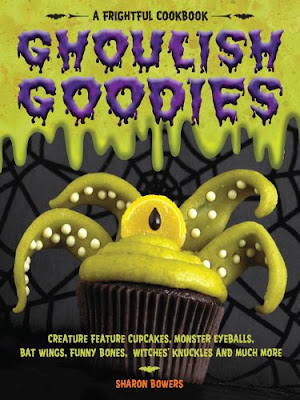
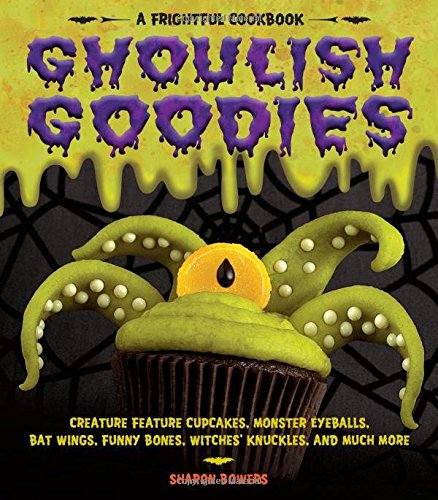
One of my favorite Halloween cookbooks is Ghoulish Goodies because it is chock full of fabulously frightful Halloween recipes and decorating ideas. From spooky yet cute, to ghoulishly grotesque, there is something for every Halloween party or gathering featured in the cookbook. 

The front cover of the cookbook gives a very accurate description of what you can expect to find within the book.  However, there is so much more than just what you see there.  The back cover gives you a bit more insight, but honestly, until you look inside the book, you will not appreciate how truly fantastic this cookbook really is for Halloween. 

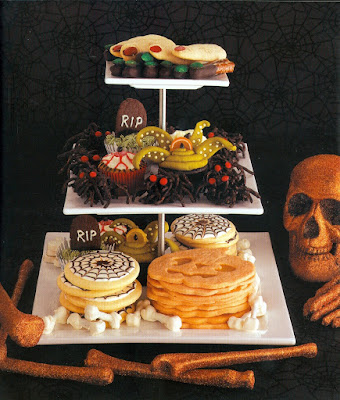
Let me show you some of my favorite recipes in the book.  Keep in mind, there are a lot more in the book though.  The features in the collage below just happen to be my personal choices.


Ghoulish Goodies Halloween Cookbook Review
This Collage was Created with Scanned Images from the Actual Cookbook


Ghoulish Goodies Cookbook


Ghoulish Goodies Cookbook<br> Paperback or Kindle Version Available!Ghoulish Goodies Cookbook
Paperback or Kindle Version Available!
Check Price
This really is a fantastic Halloween cookbook and one that every Halloween hostess should own.  Each recipe gives the exact ingredients required, along with easy to follow instructions for creating these Halloween fun food masterpieces.

It also includes lots of decorating tips alongside the individual recipes.  For instance, it tells you exactly how to make the "super grass" used on the Ghost Graveyard cake (upper right corner of the collage above).  

There are extra recipes included for dipping sauces, plus tips for decorative tray presentation.  The presentation suggestions could easily be incorporated with other Halloween food.  

Believe it or not, the author didn't stop there.  She has also included a section for Halloween supper.  Some of dinner recipes feature Candy Corn Pizza, Orange Rice, or Ghost Mashed Potatoes.  This would be a really fun supper to serve.  Although I must admit, the meatloaf with an unblinking eyeball might me just a little too grotesque for even this Halloween Hostess.

Do I sound excited to review this book?  You bet I am!  But, I am more excited about getting into the kitchen and making my own Ghoulish Goodies from this cookbook. 

Ghoulish Goodies Halloween Cookbook Review


Read More Book Reviews at
ReviewThisBooks.com


Ghoulish Goodies Halloween Cookbook Review


Read More Cookbook Reviews at ReviewThisReviews.com ~ Cookbooks


Ghoulish Goodies Halloween Cookbook Review Written by:
House of Sylvestermouse


Note: The author may receive a commission from purchases made using links found in this article. “As an Amazon Associate, Ebay (EPN), Esty (Awin), and/or Zazzle Affiliate, I (we) earn from qualifying purchases.”


Thursday, October 19, 2017

The Bright Hour: A Memoir of Living and Dying

The Bright Hour
Some books are so achingly beautiful they cry out to be read.  This is one of them.  To not read The Bright Hour would be to deny yourself one breathtaking moment after another.  This is a memoir that reveals how to savor every day—even the days, especially the days, we would not typically love.


When Nina Riggs was diagnosed with breast cancer at age 37, it was one small spot that seemed fixable.  “No one dies from one small spot,” she reassured herself.  Within a year, though, Riggs was dealing with a terminal diagnosis.  Lest you think the book turns grim at this point, let me assure you that this is not a dark accounting of impending death—far from it.

The question at the heart of The Bright Hour is this: What makes for a meaningful life when your time is limited?  It is an extraordinary individual who can see and illuminate for us the radiance and joy to be found in the seemingly mundane moments that fill our lives with meaning.  Nina Riggs’ poetic eye, and soul, gifts us over and over again with word pictures that not only dazzle, but that enrich our spirits.

What if, like Nina Riggs, we were to live the answer to that question every day?  Isn't that the key to loving our days and living with fullness of life?

The Bright Hour is the most important book I have read this year.  Having recently lost a good friend to cancer, I found this memoir to be a poignant way to reflect on how Susan also lived her life with great meaning and purpose.  It can be healing in many ways to read a book that celebrates a life force that is not diminished by death.  I highly recommend this book.


Note: The author may receive a commission from purchases made using links found in this article. “As an Amazon Associate, Ebay (EPN), Esty (Awin), and/or Zazzle Affiliate, I (we) earn from qualifying purchases.”


The Review This Reviews Contributors


SylvestermouseSylvestermouseDawn Rae BDawn Rae BMbgPhotoMbgPhotoBrite-IdeasBrite-IdeasWednesday ElfWednesday ElfOlivia MorrisOlivia MorrisTreasures by BrendaTreasures by BrendaThe Savvy AgeThe Savvy AgeMargaret SchindelMargaret SchindelRaintree AnnieRaintree AnnieLou16Lou16Sam MonacoSam MonacoTracey BoyerTracey BoyerCheryl Paton Cheryl PatonRenaissance WomanRenaissance WomanBarbRadBarbRadBev OwensBev OwensBuckHawkBuckHawkDecorating for EventsDecorating for EventsHeather426Heather426Coletta TeskeColetta TeskeMissMerFaeryMissMerFaeryMickie_GMickie_G


Review This Reviews is Dedicated to the Memory of Our Beloved Friend and Fellow Contributor

Susan DeppnerSusan Deppner

We may be apart, but
You Are Not Forgotten


“As an Amazon Associate, Ebay (EPN) and or Etsy (Awin) Affiliate, I (we) earn from purchases.” Disclosure Statement

X