Monday, October 7, 2019

Book Review: The Naturalist's Notebook by Nathaniel T. Wheelwright and Bernd Heinrich

The Naturalist's Notebook: An Observation Guide and 5-Year Calendar-Journal for Tracking Changes in the Natural World Around You is a beautiful, hardcover book that is an excellent purchase for any person who loves the great outdoors. Whether the reader's interest is plants, climate, gardening, birds or other outdoor pursuits, this is a perfect place to jot a daily note about the experience.


Appreciating and documenting the natural world.

The Naturalist's Notebook: An Observation Guide and 5-Year Calendar-Journal for Tracking Changes in the Natural World Around You by Nathaniel T. Wheelwright and Bernd Heinrich is part how-to write field notes, part inspirational, and part 5-year calendar. This book is a way to document and appreciate your natural surroundings.


"In the words of writer Richard Mabey, natural history is "a meeting place for wild life and human feeling" - Nathaniel T. Wheelwright 

The illustrations are wonderful. If you click the Amazon link, you'll be able to view some of the artwork using the "Look Inside" feature. I love these type of illustrations.


The pages are thick paper rather than thin paper or glossy paper. This paper stock is good for keeping the journal entries from bleeding through the pages as well as compliments the rustic illustrations. 

The written portion of the book is clearly written by people who love our natural world. Their passion translates from the page to the reader - motivating the reader to immediately begin being more aware outdoors.

The written chapters are:
  • Chapter One - Being Attentive
  • Chapter Two - How to Become an Observant Naturalist I
  • Chapter Three - How to Become an Observant Naturalist II
  • Chapter Four - A Naturalist's Toolbox
  • Chapter Five - Simple Experiments as a Way of Learning
  • Chapter Six - Knowing Nature Where You Are
  • Epilogue - Bird by Bird


Followed by a 5-Year Calendar-Journal. The calendar grid is numbered in such a way that you can begin on any date and any year, by adding the year in the blank spot on the left side of the pages and writing under the number that corresponds with the date. 
  • The Naturalist's Notebook ends with:
  • Personal Glossary for Abbreviations and Symbols
  • Useful Books
  • Metric Conversion
  • Timelines for Species and Events You Follow
  • Acknowledgements
  • About the Authors


I am really happy to have this notebook that both validates my love of the natural world that surrounds me as well as helps me to think about my observation skills. This book also helps me to appreciate the efforts of those who came before me. This is not an in-depth study of people such as Lewis and Clark, Henry David Thoreau, and others. But it does remind us of what a great impact their documentation of the natural world had on us. Or a biology text book. 

This book is a timely and important reminder that the natural world is important and lessons come from our own personal awareness and appreciation of the changes and seasons around us. 

Related Link:

I already sometimes document the natural world around me when I'm camping in the mountains. It is easy to notice the wildlife, weather, and plants while I'm at The Shack. I sometimes document through photography but I want to become better at documenting things more specifically. For example: exactly where and when I saw this beautiful newt. I'd like to increase my chances of finding one in the future. As the terrain there changes, I hope newts continue to live there. 

found during my hike in April


Note: The author may receive a commission from purchases made using links found in this article. “As an Amazon Associate, Ebay (EPN), Esty (Awin), and/or Zazzle Affiliate, I (we) earn from qualifying purchases.”


Sunday, October 6, 2019

How to Get Started on that eBook You've Been Meaning to Do for Decades

How to Get Started on that eBook You've Always Wanted to Do

Have You Ever Wanted to Write an eBook But Didn’t Know Where to Start?  

That’s where I was. For decades I kept saying, "I want to do a book of my lifetime poems," and kept putting it off. Finally, I took the plunge and just recently completed the book. The poems were already written, and it took me about a month to learn the ropes and put the book together. It’s a book of personally written poems and lyrics from the age of 8 to 58, entitled "We Will Have Morning Smiles."

As a newbie self-publisher, I’d like to share a few of the tools I researched and used to get this first book on the market. These are just the basics, to learn from the guru’s you’ll have to Google and find the ones you like. I did watch multiple YouTube Videos from various people, and the advice I found most helpful was Self-Publishing with Dale. I tripped on his videos after endless Google research. Compared to some, his video presentations were the easiest to follow. 

My First eBook of Poems
The advice in his videos are helpful, but to be honest, I didn’t follow all of it. One bit of information was that you should use a professional to create the cover of your book (if you can). I didn’t do that; I created my own. However, I do agree that a professional is a better way to go. 

The other is that you should, if you can, hire a professional to ‘Format’ your book. Yep, you guessed it; I didn’t do that. I formatted my own. Formatting isn’t easy, especially with a poetry book, but you can do it if you’re willing to read and learn.

Here are Three Quick Points to Help You Get Started:

1. Create Your KDP Publisher Account on Amazon - This is Where You'll Upload Your Book for Publishing

That part is easy. However, when you start filling all the information in, you'll have a lot of questions. The good thing is, KDP has a terrific help section, and customer service answers questions very quickly.

2. Google Documents or Microsoft Word - Where You'll Write Your Book

I wasn’t sure how to get a book written, formatted, then uploaded to Amazon or any other sellers platform.

After reading multiple articles on how to get started, I was more confused. 

What I found was that most people use Microsoft Word to write their books. Since I don’t have the full paid version of Word on my Laptop, I decided to use Google Documents. However, you do have to save your work in .docx format to upload it to Kindle Create (see more about Kindle Create below). 

To save your google document to a .docx format:

  • Click ‘File’ in the top left
  • Scroll down to ‘Download’
  • Several file saving options will show, choose (.docx)
  • Save the file to your computer. Done.

Oh, and guess how much I knew about Google Documents? Yep. Nada. I never had a reason to use it. However, I should have been! It’s a terrific tool. I’m using it for a ton of things now. So easy. I’m currently helping a family member out with a project and have been sharing work via Google Documents. No wonder people like it!

Here’s another google docs tip for you: 

In google docs, you can auto-generate a Table of Contents. However, on the editing bar, look for the button that says, “Normal Text." There’s a dropdown menu there that lets you choose various Heading options. 

Your Heading choices are essential because they determine what goes in your table of contents, and where:
  • Heading 1 - Puts the title as a Chapter Heading in your Table of Contents
  • Heading 2 - Places it as a Sub-Chapter below a Chapter

With my poetry book, sub-chapters were important. The main chapters are the headings that describe the types of poems, and the sub-chapters are each poem by title below it.
This is the Back Cover
It appears at the end of
the eBook on the inside

3. Download Kindle Create - Kindle Create is Where You'll Format Your Book for Publishing

There are conflicting views on using this. I would guess very experienced self-publishers don't need it.

Since I’m a newbie and Kindle Create was easy to understand, it served my needs. I’ll be using it again, at least until I become some sort of a pro. 

Download Kindle Create to your computer directly from Amazon. Then watch the video tutorials and read the help section. They’re fabulous.

Upload your saved book (either from Word or Google Docs - if that’s what you used), into Kindle Create. 

The file that's created in Kindle Create is the file you'll eventually upload to your KDP Amazon Publisher Account.

A Few Tips to Share: 

  • Kindle create generates a Table of Contents for you
  • However, I still created a detailed Table of Contents in Google Docs
  • I included both Tables of Contents in my book - The detailed Table of Contents with Sub-Chapters is from Google Docs, the other from Kindle Create only features the main chapters (because I designed it that way). You don’t have to do this, but I wanted more of a break-down.
  • It appears you can't directly internally link on your document while inside of Kindle Create. 
  • Do all your internal linking in Word or Google Docs before you upload it to Kindle Create.

Remember, these are the basics for beginner self-publishers like me. I wanted to give you a way to get started on your own ebook because I know how daunting getting started can seem.


Note: The author may receive a commission from purchases made using links found in this article. “As an Amazon Associate, Ebay (EPN), Esty (Awin), and/or Zazzle Affiliate, I (we) earn from qualifying purchases.”


Saturday, October 5, 2019

Reviewing FlexClip, a Free, Online Video Maker

How to make videos for social media sharing for FREE!
When it comes to social media it really seems as though video is king, but how can you create videos to promote yourself without buying expensive video equipment and having to learn new videography skills?   You use an online video maker!   I have tried a few different online video makers and have found they all have pros and cons, today I'm going to talk to you about FlexClip.

FlexClip are a completely free video maker which is awesome, but they also offer 2 other plans - basic and plus which offer better quality videos, longer videos and the ability to do more projects - they also allow you to add a custom watermark.

I love the fact that you can use it for free and see if you like it before committing to buying a plan.   The other thing I love is that when you make a video it doesn't include a watermark as many of the other free online video makers do.

Making a Video from Stills 


Now I am only reviewing using this to make videos from still images, but you can use it with video which I haven't had a chance to do yet.

So the actual making of the video is pretty simple and it tells you exactly how to do it BUT one of the biggest problems I felt with the program was that I could not find out what size images were best to be used.   They have lots of articles for you to read for help, but there doesn't appear to be a search function for you to simply ask the question you have which is a shame.

They list common FAQs for you to search, but when your question doesn't appear in there it is a little disheartening.

My first video was for my Arbonne business and you can see that I should've used different sized images.


What I really liked when I made this video was adding the music, there was a lot of Christmas music available for me to use.

The music that is available is definitely something that I think is good as other online video makers that I have used have not had as many different options as FlexClip.

As I enjoyed making that video I quickly turned around and made one for the offline business I work with, I still hadn't found what size images I should be using so used ones that I thought should be okay - I think they worked.

I used a different text style in this video and there are quite a few different options to use when adding text as well which I think is another positive.


I used both of these videos on Facebook and the quality seemed really good on there.

Adding Backgrounds to Images

I did have a play around and found that where I have images that aren't really the best size for this program I could add a colored background which really seemed to help.

Video Templates


FlexClip also offer a number of video templates which look great and depending on your business you may like to use them.   I have used video templates in the past, but I usually prefer to create my own initially when trying out a platform.

There are definitely a couple of the templates that I could see myself using in the future though.


My Thoughts on FlexClip


I really had my reservations when I first used it because I couldn't get an answer to my image size, but I did like all the other features and I think when I use it more I'll naturally get a feel for the size that works best anyway.

I am keen to try uploading videos and editing them (I only have my phone for taking videos so that could be interesting!) and when I do that I will review that aspect and link to it from here.

I would definitely recommend trying the free version and love, love, love that it doesn't have their logo on your videos as it looks so much better when sharing.   I am also seriously considering purchasing one of the plans as I think it's great for promoting for bloggers, zazzlers, affiliate marketers, social marketers as well as brick and mortar businesses.


Note: The author may receive a commission from purchases made using links found in this article. “As an Amazon Associate, Ebay (EPN), Esty (Awin), and/or Zazzle Affiliate, I (we) earn from qualifying purchases.”


Friday, October 4, 2019

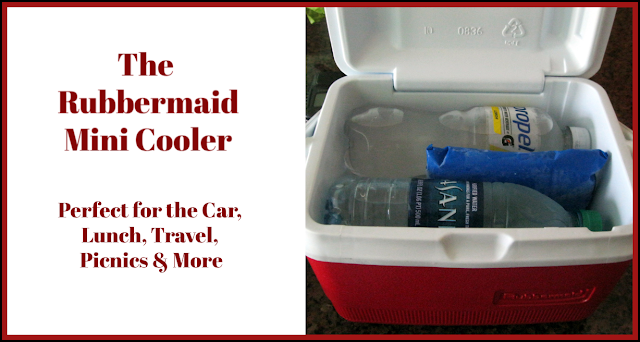
Rubbermaid Mini Cooler (5 quart) Reviewed

Rubbermaid Mini Cooler ReviewThe Rubbermaid Mini Cooler is perfect for the car!

We keep our Rubbermaid mini cooler on the floorboard in our car anytime we are going to be driving for more than a few hours.  

Sometimes, I just like to get out and go for a drive, but I don't wish to go without water.  And, I am no particularly fond of warm bottled water.  I prefer it to be cold, especially during the hot summer months.

Both my husband and I keep a bottled water in the cup holders.  However, if we are driving for a while, we end up drinking all of that one bottle and need another.  That is where the mini cooler becomes a necessity.

Yes, we could stop at a gas station or convenience store for additional water, but there isn't always one around when we need it.  Plus, bottled water or sodas are more expensive when sold individually.

This little cooler has become our regular travel companion in all of our vehicles. 


The Rubbermaid Mini Cooler Features


Rubbermaid Mini Cooler Reviewed
We have had our mini cooler for decades and it has served us well!  We have never felt a need to replace it.  I love things that can be bought once (especially at a reasonably low price) and used forever.  This little cooler has seen more places than I can remember.  Great for picnics, outings, or even pool side for those of us who don't want to track back into the house for a cool drink or snack.

It is perfect for cars, boats, motorcycles (with saddle bags), private airplanes, hot air balloons, or any recreational vehicle that has a small storage area.

It will hold 4 bottled waters (standard size - 16.9 oz) or 6 canned drinks, depending on the size of your blue ice packet.  For the cans, you would need a thin ice pack that can lay on top.  Of course, you could always fit regular ice cubes around the cans.  I started using the blue ice packets because they are less mess than melted ice (water).  Another alternative, there is a threaded hole in the lid for a Rubbermaid screw-in ice pack, but we have never used it.

You could also use it as a lunch box since it would easily hold a drink, sandwich and a few side containers.  In the hot car, I have been known to harbor a candy bar in the mini cooler along with our water or sodas.  

Rubbermaid Mini Cooler Reviewed


The Rubbermaid mini cooler is made of  hard plastic type material, therefore it doesn't get smashed or crashed when packed with luggage.  It has an easy carry rotating handle.  Because it is small, it is extremely easy to wash in the kitchen sink, when needed.  Most of the time though, ours only requires a quick wipe with a damp cloth and we are all set to go for our next long drive. 

We recently made an 11 hr. drive.  When we arrived at our destination hotel, the remaining water was still cool. We carried our little cooler to our hotel room with us. It makes an awesome hotel companion if the room doesn't have a mini-fridge!

I would like to note, my mini cooler in the photos is an older version of the featured cooler below.  I sure would love to have that blue one.  Isn't it pretty?!!

Choose Your Favorite Color! Plus a Pack or Blanket of Ice

 Rubbermaid Cooler, 5 Quart, BlueCheck Price Rubbermaid Cooler, 5 Quart, RedCheck Price Rubbermaid Blue Ice Single Blanket Reusable Ice PacksCheck Price Rubbermaid Blue Ice Lunch PackCheck Price


Read More Product Reviews On
ReviewThisProducts.com


House of Sylvestermouse


Note: The author may receive a commission from purchases made using links found in this article. “As an Amazon Associate, Ebay (EPN), Esty (Awin), and/or Zazzle Affiliate, I (we) earn from qualifying purchases.”


Thursday, October 3, 2019

Bark Ranger Review

bark ranger training
Finn Earns His Bark Ranger Badge
If you are blessed enough to have a Border Collie in your life, you already know that he needs a job and a purpose.  My Finn is no exception.  His beautiful mind needs plenty of stimulation every day.  It's my job, privilege, and pleasure to find new ways of providing Finn with daily opportunities to take his immense capabilities to the next level.

Recently, when I was planning our next outdoor adventure, I came across information about the Bark Ranger Program sponsored by the National Park Service.  Why had I never heard about this before?  It seems this program is really starting to take off in parks across the country. 

pecos national historical park sign
Arriving at Pecos National Historic Park
Finn and I wasted no time heading for the closest national park with a Bark Ranger Program.  That happened to be Pecos National Historical Park in New Mexico.  They launched their program earlier this summer.  Perfect!  A day trip to the Santa Fe area is always a treat.  

pecos national historical park visitor center
Pecos NHP Visitor Center
So Many Architectural Delights
visitors center bench
Such a Welcoming Place
visitors center at pecos national historical park sign
I Could Sit Here Every Day
When we arrived at the visitor's center, it took no time at all to launch Finn's new bark ranger career. The main purpose of the program is to ensure dogs and their humans have a safe and enjoyable time in the park.  Keeping the national parks dog-friendly takes some responsibility on the part of those of us who travel with our pets.

The BARK acronym makes it easy to remember the promises you are held to when becoming a bark ranger team.  First, you promise to bag your dog's waste and to dispose of it appropriately.  Next, you pledge to always leash your pet.  In parks such as Pecos NHP, a leash could save your dog's life.  Rattlesnake sightings are frequent.

Respecting wildlife is another part of the oath taken when you choose to be a bark ranger.  The very presence of a dog in any park changes the dynamic for wildlife.  In order for national parks to remain a refuge for wild creatures, it is critical to avoid any encounters between pets and the animals that call that park home.  

dog in a stroller
Finn's Access to Pecos NHP Included the Main Trail to the Pueblos
pecos mission
Pecos Mission and Pueblo
And finally, every visit to a national park should start with knowing which areas of the park are accessible to dogs.  At Pecos NHP, Finn was able to accompany me on the main trail to the mission and pueblos.  I chose to keep him leashed in his dog stroller rather than use his K9 Cart (wheelchair) due to the presence of rattlesnakes in the park.  I knew it would be the safer option.

In some parks, you can volunteer as a Bark Ranger Ambassador team.  This is something I want to pursue with Finn.  It is my aspiration for us to serve in this capacity at our closest national park (Great Sand Dunes).  First, I'd like to help get a Bark Rangers Program started locally.  I wasn't able to find any Colorado national parks with an existing program.  The only current bark rangers opportunity I found was at Eldorado Canyon State Park, which is a good distance from where we live.

Having previously worked in a national park (Padre Island National Seashore), I get excited just thinking about the powerful teaching moments that take place in park settings.  Even yesterday, shortly after becoming a Bark Ranger, Finn made an impact while engaging with visitors at Pecos NHP.  One couple in particular told me that Finn had made their day and had made them happy.  It takes a special Bark Ranger to do that and Finn has a gift for elevating the quality of a day. 

If you love to travel with your dog, and enjoy sharing the national parks with your pet, I encourage you to join the Bark Ranger Program (you can search online to find which parks already have the program).  I'm really glad Finn and I took that trek to Pecos NHP.  It is surely the beginning of many beautiful and fulfilling connections for us.  I can't wait to see where this leads.


Note: The author may receive a commission from purchases made using links found in this article. “As an Amazon Associate, Ebay (EPN), Esty (Awin), and/or Zazzle Affiliate, I (we) earn from qualifying purchases.”


Most Recent Reviews on Review This Reviews


Search for Reviews by Subject, Author or Title

The Review This Reviews Contributors


SylvestermouseSylvestermouseDawn Rae BDawn Rae BMbgPhotoMbgPhotoBrite-IdeasBrite-IdeasWednesday ElfWednesday ElfOlivia MorrisOlivia MorrisTreasures by BrendaTreasures by BrendaThe Savvy AgeThe Savvy AgeMargaret SchindelMargaret SchindelRaintree AnnieRaintree AnnieLou16Lou16Sam MonacoSam MonacoTracey BoyerTracey BoyerCheryl Paton Cheryl PatonRenaissance WomanRenaissance WomanBarbRadBarbRadBev OwensBev OwensBuckHawkBuckHawkDecorating for EventsDecorating for EventsHeather426Heather426Coletta TeskeColetta TeskeMissMerFaeryMissMerFaeryMickie_GMickie_G


Review This Reviews is Dedicated to the Memory of Our Beloved Friend and Fellow Contributor

Susan DeppnerSusan Deppner

We may be apart, but
You Are Not Forgotten


“As an Amazon Associate, Ebay (EPN) and or Etsy (Awin) Affiliate, I (we) earn from purchases.” Disclosure Statement

X